-
Shop
- Advanced Technologies
- AI Career Advantage Collection
- AI Skills
- AI Skills for Creators & Freelancers
- AI Client Management
- AI Ethics
- AI Mindset
- AI Tools & Prompts
- AI Writing & Content Creation
- Audio, Voice & Music
- Design & Visual Creation
- Email, Messaging & Communication
- Freelancing & Business
- Marketing, Ads & Conversion
- Productivity, Workflow & Automation
- SEO & Search Optimization
- Social Media Content & Growth
- Strategy, Planning & Analytics
- Video Creation & Editing
- Bathroom
- Beauty
- Best-Sellers
- Car Accessories
- Car Buying & Ownership
- Confidence
- Dating & Social Skills
- Digital Resources
- AI & Technology
- Budgeting & Saving
- Cozy Feast Collection
- Electronics & Technology
- Emotional Intelligence
- Entrepreneurship & Business Growth
- Financial Education
- Financial Independence
- Financial Mindset & Psychology
- Goal Setting
- Hobbies
- Kitchen & Recipes
- Leadership
- Mindfulness
- Mindset
- Motivation
- Online Business
- Positive Thinking
- Productivity
- Self Confidence
- Sleep Improvement
- Smart Life with AI
- Stress Management & Relaxation
- Travel Planning
- Yoga & Fitness
- Yoga & Mind-Body Practices
- Education & Learning
- Family & Parenting
- Gadgets
- Health & Beauty
- Health & Wellness
- Home & Garden
- Home Styling & Organization
- Home Supplies
- Kids & Babies
- Legend Footwear Brands Collection
- Online Business for Beginners
- Parenting & Child Development
- Patio, Lawn & Garden
- Personal Growth
- Personal Style & Fashion
- Pet Care
- Pet Lifestyle & Wellness
- Pet Supplies
- Pets
- Smart Amazon Shopping
- Stress Relief & Relaxation
- TikTok Growth & Monetization Mastery
- Travel
- Travel & Adventure
- Wealth
- Wellness
- Popular
- Best deals
Real-World Guide: 8K 5G GPS Dual-Camera Drone
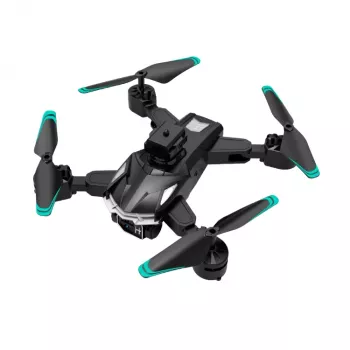
8K 5G GPS Dual-Camera Professional Drone for Aerial Photography: What to Expect in Real Flights
A dual-camera GPS drone with 8K capture potential and 5G transmission is designed for creators who want steadier aerial footage, more predictable flight behavior, and flexible framing without constantly landing to reposition. The difference between “spec sheet” and “usable results” comes down to a few practical factors: light, wind, GPS lock quality, and how intentionally you plan each take.
Below is a real-world guide to the features that matter most on location—camera modes, GPS-assisted functions, range considerations, and a first-flight setup flow—so flights feel controlled and footage looks intentional.
Who This Drone Fits Best
- Aerial photography and travel creators who want higher-resolution capture and quick framing changes using a dual-camera setup
- Real estate and property showcase videos that benefit from GPS stability, smoother pans, and repeatable flight paths
- Outdoor hobbyists who want GPS-assisted return and positioning features for calmer flights in open areas
- Content teams needing fast deployment: simple calibration, quick launch, and straightforward smartphone pairing
If your typical shoot includes wide landscapes, rooftops, coastlines, or large outdoor venues, a GPS-assisted hover and smooth, slow movement style tends to deliver the most consistent footage—especially when you keep expectations realistic around wind and signal conditions.
Core Features That Shape Real-World Results
- 8K capture potential: Best used in bright conditions to maximize detail and reduce noise; plan for larger file sizes and longer transfer times.
- 5G image transmission: Intended for lower-latency viewing and framing; real performance depends on local interference and device compatibility.
- GPS positioning: Improves hover stability and helps maintain location during slower cinematic moves.
- Dual-camera versatility: Switch angles for wider establishing shots vs. closer framing without landing to physically adjust the drone.
- Flight safety basics: Always treat obstacle risk seriously—wide lenses can hide thin branches and cables.
| Feature | Best for | Tips to get better output |
|---|---|---|
| 8K capture | Landscapes, architecture, wide establishing shots | Shoot in strong daylight; keep movements slow; stabilize in post if needed |
| 5G live view/transmission | Precise framing, tracking a subject, adjusting composition quickly | Test your phone connection before takeoff; avoid congested RF areas |
| GPS positioning | Smooth cinematic passes and stable hovers | Wait for a strong GPS lock before filming; calibrate if the app requests it |
| Dual-camera switching | Mixing wide and tighter perspectives in one session | Plan a shot list so camera changes happen during calmer moments |
| Return-to-home behavior | Reducing risk when signal drops or battery runs low | Confirm home point and RTH altitude; keep takeoff area clear |
Camera and Shooting Modes to Prioritize
High-resolution footage pays off most when the drone’s motion is deliberate. Fast, jerky inputs can make even sharp footage feel “cheap,” while slow, smooth movement lets detail read cleanly.
- Cinematic moves: Use slow forward flight combined with gentle yaw for parallax around buildings, trees, or coastline edges.
- Reveal shots: Start behind an object (tree line, ridge, roofline) and rise slowly to reveal the scene; maintain consistent speed for smoother edits.
- Top-down mapping-style clips: Hover, then move in straight lines for clean geometry; GPS helps keep drift minimal.
- Dual-camera sequencing: Capture a wide establishing shot first, then switch to the alternate camera for tighter details on the same subject.
- Lighting discipline: Avoid noon glare on reflective surfaces (water, glass); golden hour improves perceived sharpness and color separation.
GPS Flight Functions and What to Check Before Takeoff
For U.S. operators, it’s also worth reviewing current guidance for recreational and commercial flight rules before you fly: FAA — Flying Drones Recreationally and FAA — Part 107 Small UAS Rule.
Battery, Range, and Storage: Practical Expectations
Transmission performance is also environment-dependent. If your live view feels inconsistent in a busy area, that can be normal RF congestion rather than a drone fault. The FCC’s consumer guidance is a useful baseline reference: FCC — Wireless Devices and Interference (Consumer Guidance).
Setup Checklist for First Flight
Product Overview and What’s Included
If you’re building an aerial kit for travel footage, outdoor scenic capture, property flyovers, or social content that benefits from a higher vantage point, the 8K 5G GPS Dual-Camera Professional Drone for Aerial Photography is set up for flexible framing and steadier GPS-assisted flight in open areas. Before buying or flying, check local regulations for registration requirements and operational limits.
| Item | Details |
|---|---|
| Product name | 8K 5G GPS Dual-Camera Professional Drone for Aerial Photography |
| Price | $162.51 USD |
| Availability | In stock |
| Primary strengths | Dual-camera flexibility, GPS assistance, high-resolution capture potential |
Helpful add-ons for property content and staging
- Styling High-End Living Room | eBook Guide (Digital Download) for improving interior visuals that complement your exterior flyover footage
- Luxury 70″ Fluted Fireplace TV Stand as a photogenic focal piece for listing photos and walkthrough videos
FAQ
Does GPS make the drone fly itself safely?
GPS helps the drone hold position more steadily and supports features like return-to-home, but it doesn’t prevent collisions. Safe flight still depends on maintaining visual line of sight, avoiding obstacles, and following local rules.
When does 8K video actually look better than lower resolutions?
8K tends to look best in bright light on wide landscapes or architecture, and it’s especially useful when you want to crop or reframe in editing. In low light, noise can reduce the advantage, so slower movements and stable hovers help preserve detail.
What should be checked before using return-to-home?
Confirm the home point is correct, set a safe return-to-home altitude above nearby obstacles, and keep enough battery margin for the drone to climb and return. Make sure the takeoff/landing area stays clear, and remember that slopes, trees, and changing terrain can affect the safest path back.
Recommended for you
Retro Metal Dining Chair: Size, Comfort & Care Guide
Sep 29, 2026
Where to Park Your House Down Payment Money
Sep 30, 2026













Leave a comment